The agent loop, from first principles
Companion code: 01-agent-loop
TL;DR
- An agent is a language model inside a loop. The model picks an action, your code carries it out, the result goes back into the model’s context, and the loop repeats until the model decides it’s done.
- The model doesn’t run anything itself. The harness (the code around the model) runs the tools, keeps the state and enforces the limits. Most of the engineering lives in the harness.
- You can write a working agent in about 100 lines without a framework. Do it once, and every framework becomes easier to read.
Why start here
“Agent” has become a marketing word. It gets attached to chatbots, workflow builders and fully autonomous coding systems alike. To build these systems well, you need a definition precise enough to reason with. The most useful one is mechanical:
An agent is a system in which a model decides, at each step, which action to take next, and keeps going until it judges the goal is met.
The important word is decides. In a workflow, your code fixes the sequence of steps: call the model to classify, then call it to summarise, then send an email. In an agent, the model chooses the sequence at run time. That one difference is why agents can handle open-ended tasks, and also why they are harder to predict, test and pay for.
Anthropic’s widely cited essay Building effective agents draws this same line between workflows and agents. Its practical advice is to use the simplest option that works. Many production systems that look like agents are well-designed workflows, and that’s fine. This post is about what you get when you do need the model to steer.
The loop
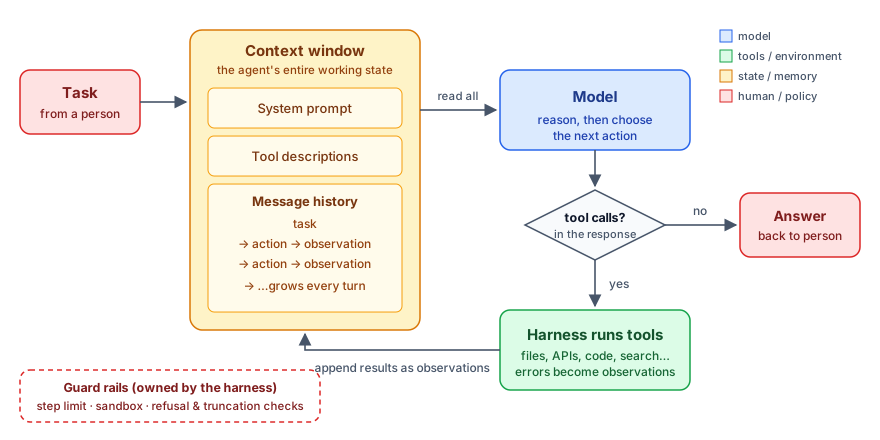
Every agent runs some version of this cycle:
- Read. The model receives its whole context: instructions, descriptions of the available tools, and the full history of the task so far.
- Reason and choose. The model either produces a final answer, or emits one or more structured tool calls, such as “call
read_filewithname="sales.csv".” - Act. Your code (the harness) runs those calls against the real world: files, APIs, databases, a shell.
- Observe. The results go back into the history as new input.
- Repeat until the model stops asking for tools, or a guard rail stops the run.
Two things in this picture are easy to miss.
The context window is the agent’s entire state. The model has no hidden memory between calls. Everything it “knows” about the task is in the message list you send each time. If something isn’t in that list, the agent has forgotten it. This is why later topics in agent engineering, such as context engineering, memory, compaction and sub-agents, are all really about managing that list.
The model never touches the world directly. It produces text, and some of that text is a structured request. Your code decides whether to honour the request, how to run it, and what to report back. That boundary is where safety, permissions and reliability live.
Where the idea came from
The loop looks obvious now, but it came together over a few years of research.
- Reason, then act, then observe. The ReAct paper (Yao et al., 2022) showed that interleaving free-text reasoning with actions, and feeding each action’s result back in, beat both “just reason” and “just act” on question-answering and interactive tasks. Reasoning helps the model plan and recover, and acting grounds it in real information instead of what it remembers.
- Models can learn when to call tools. Toolformer (Schick et al., 2023) showed that a model can learn to decide on its own when an API call (a calculator, a search engine) would help, and how to use the result.
- A common anatomy. The survey The Rise and Potential of LLM-Based Agents (Xi et al., 2023) described agents as a “brain” (the model), “perception” (what comes in) and “action” (what goes out). It’s a useful mental model, and the loop above is its simplest working form.
What changed between those papers and today is mostly reliability. Models now produce well-formed tool calls consistently, follow long instructions, and recover from errors. So the loop that was a research demo in 2022 is now the core of production coding and research agents.
Build it: an agent in about 100 lines
The companion code (01-agent-loop) is a small data-analyst agent. It has three tools over a sandboxed folder: list_files, read_file and calculate. You ask it a question about the sales data, and it works out how to answer.
1. Tools are functions plus a description
A tool has two halves: the code that runs, and a schema the model reads to decide when and how to call it.
def read_file(name: str) -> str:
    path = (WORKSPACE / name).resolve()
    if path.parent != WORKSPACE.resolve():  # keep the agent inside its sandbox
        raise ValueError(f"{name!r} is outside the workspace")
    return path.read_text(encoding="utf-8")
{
"name": "read_file",
"description": "Return the full text of one workspace file, by file name as shown by list_files.",
"input_schema": {
"type": "object",
"properties": {"name": {"type": "string", "description": "File name, e.g. 'sales.csv'"}},
"required": ["name"],
"additionalProperties": False,
},
"strict": True,
}The description is a prompt. “Call this first to see what data exists” and “Use this instead of doing math in your head” change the model’s behaviour as much as any system prompt. We’ll come back to tool design in a later post. For now, write descriptions as if for a new colleague who can’t ask you questions.
2. Acting turns failures into observations
def run_tool(block) -> dict:
    try:
        output = TOOLS[block.name](**block.input)
        return {"type": "tool_result", "tool_use_id": block.id, "content": output}
    except Exception as exc:  # the model sees the error and can recover
        return {"type": "tool_result", "tool_use_id": block.id, "content": str(exc), "is_error": True}
This small function captures an important design choice. A failed tool call is information, not a crash. If the model asks for a file that doesn’t exist, it should see “file not found” and try something else. Agents that hide errors from the model can’t recover from them.
3. The loop itself
def run_agent(task: str) -> str:
    messages = [{"role": "user", "content": task}]  # this list *is* the agent's state

    for step in range(1, MAX_STEPS + 1):
        response = client.beta.messages.create(
            model=MODEL, max_tokens=16000, system=SYSTEM,
            tools=TOOL_SCHEMAS, messages=messages, ...
        )
        messages.append({"role": "assistant", "content": response.content})

        tool_calls = [b for b in response.content if b.type == "tool_use"]
        if not tool_calls:  # no more actions requested: the model is done
            return "".join(b.text for b in response.content if b.type == "text")

        results = [run_tool(call) for call in tool_calls]
        messages.append({"role": "user", "content": results})

    return f"[stopped after {MAX_STEPS} steps without finishing]"
That’s the whole agent. Map it back to the diagram:
| Diagram | Code |
|---|---|
| Context window | messages (plus system and TOOL_SCHEMAS) |
| Model reasons and chooses | client.beta.messages.create(...) |
| Tool calls? | tool_calls = [...]; empty means done |
| Harness runs tools | run_tool(call) |
| Append observations | messages.append({"role": "user", "content": results}) |
| Guard rails | MAX_STEPS, the sandbox check, the refusal and max_tokens checks in the full file |
A typical run looks like this:
[step 1] list_files({}) -> 'notes.md\nsales.csv'
[step 2] read_file({"name": "sales.csv"}) -> 'region,quarter,revenue_usd\n...'
[step 3] calculate({"expression": "214900 - 201250"}) -> '13650'
South led Q3 with $214,900, beating North (the runner-up) by $13,650.
We never told it to list the files first, read the CSV, or use the calculator for the difference. The model planned that sequence from the task and the tool descriptions. Run it again and the path may differ, for example by reading notes.md too and mentioning South’s new distributor. That variability is the feature and the cost at the same time.
What the harness owns
Strip away the model call, and everything left is the harness. Even in this toy version it already does five jobs:
- State. It keeps the message list and decides what goes into it.
- Execution. It runs tools, and it decides which tools exist at all.
- Containment. The sandbox check in
read_fileand the arithmetic-onlycalculatelimit what the agent can touch, whatever the model asks for. - Termination.
MAX_STEPSguarantees the loop ends. A model that never says “done” is a real failure mode, not a hypothetical one. - Error handling. Tool exceptions become observations. Refusals and truncated output are detected instead of silently passed on.
Production agents add more to each of these: context compaction once the history gets long, permission checks before risky actions, checkpoints so a run can resume after a crash, and traces so you can debug what happened. But the shape stays the same. In 2026 the industry calls this harness engineering, and it’s where most of the work in building good agents now goes. Later posts in this series cover each of those additions.
Trade-offs: when not to use an agent
An agent loop costs you three things a fixed workflow doesn’t.
- Predictability. The path changes from run to run. That makes testing harder, because you evaluate outcomes over many runs, not one golden output.
- Cost and latency. Every step re-sends the growing context. A ten-step task can cost many times more than one well-designed call.
- Blast radius. The model chooses actions, so a confused or manipulated model can choose bad ones. Containment has to be designed in, not added later.
So the rule of thumb holds. If you can write down the steps in advance, write a workflow. Reach for the loop when the path really depends on what the agent finds along the way, such as debugging, research or open-ended data questions, and when you can check the result.
Try it
Clone agentic-systems-ai/examples, open 01-agent-loop, and run:
pip install -r requirements.txt
python agent.py "Which region grew fastest from Q1 to Q3?"
Then break it on purpose. Ask about data that doesn’t exist, ask it to read a file outside its sandbox, or set MAX_STEPS = 2. Watching how the loop fails teaches you more than watching it succeed.
Next in the series: Workflows vs. agents: five patterns you actually need.
Sources & further reading
- Anthropic, Building effective agents (Dec 2024): workflows vs. agents, and composable patterns.
- Yao et al., ReAct: Synergizing Reasoning and Acting in Language Models (2022).
- Schick et al., Toolformer: Language Models Can Teach Themselves to Use Tools (2023).
- Xi et al., The Rise and Potential of Large Language Model Based Agents: A Survey (2023).
- Anthropic, Effective harnesses for long-running agents (Nov 2025), and OpenAI, Harness engineering (Feb 2026): where the harness goes next.