Context is a budget: a practical guide to context engineering
Companion code: 03-context
TL;DR
- An agent’s context window is its entire working state, and it’s re-read on every step. Each token you put there costs money on every later step, and makes the model a little worse at finding what matters.
- Spend the budget deliberately: keep the start stable (so it’s cached), load information just in time, write important facts down outside the window, and trim old material by clearing or compaction.
- One 2026-specific rule: don’t edit the middle of the history. Append to it, let the server trim it, or replace it wholesale with a summary.
Why “budget” is the right word
In post #1 we saw that an agent has no memory between model calls. Everything it knows about the task is in the message list you send each time. That makes the context window two kinds of budget at once.
A cost budget. An agent loop re-sends the whole history on every step. A tool result read at step 3 is paid for again at step 4, 5 and every step after, so total cost grows roughly with the square of the number of steps. Prompt caching softens this considerably, and we’ll come back to it.
An attention budget. Models don’t use a long context evenly. The 2023 paper Lost in the Middle showed that language models find information placed in the middle of a long input noticeably less reliably than information near the start or end. Chroma’s 2025 Context Rot study tested 18 current models and found that performance drops as input length grows, even on simple tasks and well before the window is full. A bigger window raises the ceiling, but it doesn’t remove the slope.
So the question isn’t “will it fit?” but “is each token earning its place?” Anthropic’s Effective context engineering for AI agents (September 2025) gave the practice its name. Prompt engineering is about writing good instructions. Context engineering is about curating everything the model sees on each call: instructions, tool definitions, retrieved data, and the growing history of the task.
What’s in the window
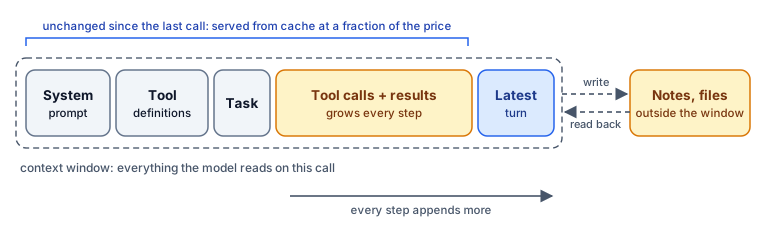
In a short chat, the system prompt dominates. In an agent working for a while, tool results dominate: file contents, search results, command output, API responses. That’s where most context engineering happens.
The companion code makes this concrete. An agent must read 24 incident reports, about 45k tokens in total, to answer one question: which service had the most downtime, how much, and what usually caused it. Each step prints the size of the context the model just read:
  step 5    9,812 tok  cached   8,104  #########
  step 6   11,530 tok  cached   9,890  ###########
The numbers above only show the format. Run the code to see your own: with the naive strategy, the bar grows with every report the agent reads. Our measured results for all three strategies are near the end of this post.
Rule 1: Keep the start stable
Model providers cache the processed form of a prompt’s prefix, the part that’s identical to the previous request. On a cache hit you pay a small fraction of the normal input price. For Claude Opus 5.5 in September 2026, cached input costs a twentieth of uncached input. The catch is that caching is an exact prefix match: change one byte near the start and everything after it is a cache miss.
Manus’s write-up Context Engineering for AI Agents: Lessons from Building Manus (July 2025) calls cache hit rate the single most important metric for a production agent, and the reasoning holds up. An agent re-reads its prefix dozens of times per task, so a broken cache can multiply your bill.
In practice:
- Freeze the system prompt for the whole run. No timestamps, no per-request IDs, no “current step: 7”.
- Keep tool definitions identical and in the same order. If tools must change mid-task, prefer mechanisms that don’t rewrite the list. Manus’s advice is to mask tools rather than remove them.
- Append; don’t rewrite. New information goes at the end.
The demo does all three, and turns caching on with one line:
cache_control={"type": "ephemeral"}, # cache everything up to the latest messageRule 2: Load just in time, not just in case
The tempting design is to put everything the agent might need into the prompt up front: every document, every record. The better default is to give the agent cheap ways to look things up, and let it fetch what it needs when it needs it.
Our agent starts with only the task. It calls list_files to see what exists, then reads reports one or two at a time. Anthropic’s guide describes the same approach in coding agents: keep lightweight identifiers such as file paths, links and queries in context, and load the content only when it’s needed. Tools like grep, head and tail exist because they return less.
Pre-loading still has a place for small, stable material the agent always needs, such as a style guide or a short policy. Put it in the system prompt, where it stays cached.
Rule 3: Write things down outside the window
If the context is short-term memory, the agent needs somewhere longer-lived. The simplest version is a note-taking tool:
def save_note(note: str) -> str:
    notes.append(note)
    return f"saved ({len(notes)} notes so far)"
The system prompt tells the agent to call it after each report: “INC-1007: auth, 42 min, bad deploy.” The facts it needs now take a few dozen tokens instead of 1,600, and they’re stored outside the context window, so no trimming strategy can lose them.
Writing things down is what makes the next rule safe. Manus pushes the idea further, using the sandbox’s file system as unlimited memory and keeping a running todo.md that the agent rewrites so its goals stay near the end of the context. Anthropic’s guide describes an agent playing Pokémon for many hours on the strength of its own notes. The idea is old: MemGPT (2023) framed it as an operating system paging between fast and slow memory.
Rule 4: Trim deliberately
Even with notes, the history keeps growing. There are three main ways to cut it back.
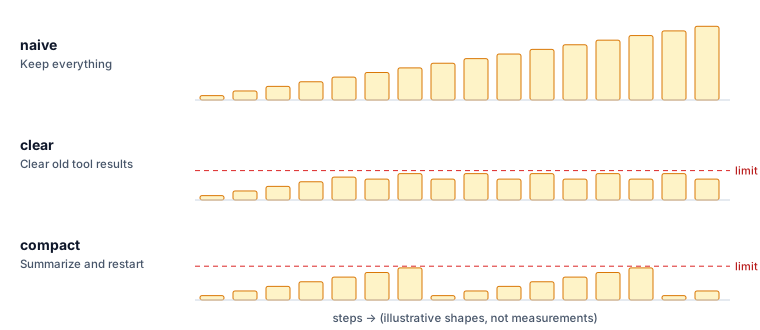
Clear old tool results. Once a file has been read and noted, its full text is dead weight. Clearing removes the content of old tool results but leaves the record that the call happened. It’s the lightest-touch option, because the conversation’s structure and the agent’s own reasoning stay intact. The demo has the API do it on the server:
"context_management": {"edits": [{
    "type": "clear_tool_uses_20250919",
    "trigger": {"type": "input_tokens", "value": CLEAR_AT},
    "keep": {"type": "tool_uses", "value": 2},
    "exclude_tools": ["save_note"],
}]}
Summarize and restart (compaction). When the context passes a threshold, ask the model for a short progress summary, then start a fresh conversation from the task, the summary and the saved notes. This resets the size completely, but anything the summary leaves out is gone. The ACE paper (Agentic Context Engineering, 2025) names two failure modes worth knowing: brevity bias, where summaries drop useful detail in favour of being concise, and context collapse, where repeated rewrites wear knowledge down over time. Notes kept outside the window guard against both.
Hand work to a sub-agent. Give a self-contained job, like “read these 12 reports and return a table”, to a separate agent with its own fresh context. It returns a short result, so the lead agent only ever sees the summary. We’ll look at the costs and benefits in post #7, One agent or many?
| Clearing | Compaction | Sub-agent | |
|---|---|---|---|
| Removes | old tool results | the whole history except a summary | the details of one subtask |
| Keeps | the conversation’s structure and reasoning | only what the summary and notes contain | only the sub-agent’s answer |
| Risk | the agent needs a cleared result again | the summary drops something important | the hand-off loses context |
| Best for | read-once tool output (files, searches) | long tasks with clear phases | separable, read-heavy subtasks |
The 2026 rule: don’t edit the middle
This last rule is new, and it catches out home-grown agent loops. The obvious way to implement clearing yourself is to loop over your messages list and blank out old tool results before each call. Don’t.
There are two reasons:
- It defeats caching. An edit near the start invalidates the cached prefix from that point on, so you pay full price to re-read everything after it.
- It can be rejected outright. Current reasoning models produce hidden reasoning between tool calls, and some providers now tie that reasoning to the exact history it came from. Claude’s newest models check that the system prompt, the tools and every earlier message are byte-for-byte unchanged before they reuse earlier reasoning. On accounts created since late August 2026, a request whose history was edited in the middle is refused with an error.
The safe moves are the ones the demo uses:
- Append-only histories. Add new information at the end, never rewrite what’s there.
- Server-side trimming. When the API clears tool results itself, your copy of the history stays unchanged. The
clearstrategy works this way. - Wholesale replacement. Compaction that starts a new conversation from a summary doesn’t alter the old one; it simply stops sending it. The
compactstrategy works this way.
def compact(messages: list) -> list:
    request = messages + [{"role": "user", "content":
        "Pause. In under 150 words, summarize progress: which reports are done, and anything not yet in your notes."}]
    summary = ...  # one call, tools disabled
    return [{"role": "user", "content":
        f"{TASK}\n\nYou are resuming earlier work.\nProgress summary:\n{summary}\n\nSaved notes:\n" + "\n".join(notes)}]
Even the summary request is append-only: it adds a question at the end of the existing history instead of changing anything in it.
What not to trim
Context engineering isn’t only about shrinking. A few things are worth their tokens:
- Errors and failed attempts. Manus’s “keep the wrong stuff in” lesson: a model that can see its earlier mistake is less likely to repeat it. Clear old successful output first.
- The current goal. In long tasks, restating the objective near the end of the context (a todo list, a plan) counteracts the lost-in-the-middle effect.
- Variety. A context full of near-identical action/observation pairs can lock a model into a rut. Manus warns against agents “few-shotting” themselves into repeating a pattern.
Try it
cd examples/03-context
python agent.py --strategy naive
python agent.py --strategy clear
python agent.py --strategy compact
Each run prints the context size at every step, the share served from cache, an estimated cost, and the correct answer to compare against. Three things to look for:
- Peak context:
naivekeeps climbing, whileclearandcompactlevel off. - Cache behaviour: most steps should be mostly cache reads. Watch the step right after a clear or a compaction, where the prefix changes and the cache has to be rebuilt.
- Notes matter: remove
save_noteand runclearagain. Clearing without notes forces the agent to re-read reports, or answer from memory it no longer has.
What we measured
We ran all three strategies against Claude Opus 5.5, once each. All three found the right answer (auth, 760 minutes, mostly database failover).
| Strategy | Peak context | Tokens read | From cache | Est. cost |
|---|---|---|---|---|
| naive | 72,432 | 546,693 | 87% | $0.51 |
| clear | 11,620 | 274,673 | 38% | $0.96 |
| compact | 25,456 | 204,873 | 74% | $0.38 |
Two results are worth more than the table.
Clearing cut the context and doubled the bill. It kept the peak six times smaller and halved the tokens read, and still cost the most. The log shows why. Once past the threshold, the server cleared old results on every request, and because only the two most recent tool results were kept, the cut-off point moved each step. Every move changed the start of the context, so the cache had to be rebuilt at full price over and over: only 38% of tokens came from cache, against 87% for the naive run. The “caching changes the maths” warning below is not theoretical. If you clear, clear rarely and in big chunks: a higher trigger, more recent results kept, and a minimum amount to clear each time, which the API’s clear_at_least option exists for.
Clearing can outrun note-taking. The agent read several reports per turn, and some were cleared before it had saved notes on them. It still answered correctly, but it said so itself: it had written some notes after the result was gone, and suggested re-reading the reports “if you need a result you can rely on”. An agent that knows it lost information is the good outcome. The lesson is to keep enough recent results for the agent to finish processing what it has just read.
Compaction was the cheapest and stayed reliable, because each restart from summary plus notes happened only a few times, and between restarts the cache stayed warm.
Trade-offs
- Every trim is a bet. Clearing bets the agent won’t need that result again. Compaction bets the summary kept what matters. Save facts outside the window to hedge both bets.
- Thresholds are workload-specific. The demo’s limits are set low so you can watch them trigger. In production, trim well before quality drops, and measure the effect on answers, not just on tokens.
- Caching changes the maths. With a warm cache, keeping a mid-sized history can be cheaper than trimming it, because a trim forces a fresh, full-price cache write. Clear in large batches, not a few tokens at a time.
Next in the series: Designing tools agents can actually use.
Sources & further reading
- Anthropic, Effective context engineering for AI agents (Sep 2025): context as a finite attention budget; just-in-time retrieval; compaction, note-taking and sub-agents.
- Yichao “Peak” Ji, Context Engineering for AI Agents: Lessons from Building Manus (Jul 2025): KV-cache-first design, masking tools, the file system as memory, keeping errors in context.
- Chroma, Context Rot: How Increasing Input Tokens Impacts LLM Performance (2025).
- Liu et al., Lost in the Middle: How Language Models Use Long Contexts (2023).
- Packer et al., MemGPT: Towards LLMs as Operating Systems (2023).
- Zhang et al., Agentic Context Engineering: Evolving Contexts for Self-Improving Language Models (2025).
- Claude API documentation: context editing, and how thinking blocks are preserved across turns.