Workflows vs. agents: five patterns you actually need
Companion code: 02-patterns
TL;DR
- In a workflow, your code decides which model calls happen and in what order. In an agent, the model decides. Most systems that work well in production are workflows, or workflows with one small agent inside.
- Five patterns cover nearly every workflow: chaining, routing, parallelization, orchestrator-workers and evaluator-optimizer. Each one trades a little flexibility for a lot of predictability.
- Reach for a full agent only when you can’t write the steps down in advance. The patterns below help you tell whether you’re really in that situation.
The spectrum
Last time we built an agent: a model in a loop, choosing its own next action until it decides it’s done. That’s one end of a spectrum. At the other end is a single model call: one prompt in, one answer out.
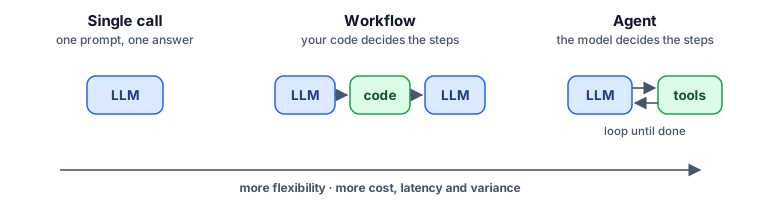
Between the two ends sit workflows: several model calls joined together by ordinary code. The code fixes the structure: which calls happen, in what order, and what decides the branches. The model does the language work inside each step.
The most influential write-up of this middle ground is Anthropic’s Building effective agents (December 2024). It names five workflow patterns that keep turning up in systems that work, and its central advice is to use the simplest one that solves the problem. This post walks through those five patterns on a single running example, with code for each. It also adds a comparison the essay doesn’t attempt: what each pattern costs in model calls and waiting time.
The running example
Every pattern below works on the same job: answering the support inbox for Larkspur, a fictional SaaS product. There are three tickets:
- billing: “I was charged $49 twice this month (invoice INV-20931).”
- bug: “CSV export fails on our 80k-row workspace; it’s blocking our quarterly report.”
- mixed: “The export fails, how do I add an admin, and do we get money back if we downgrade mid-month?”
There’s also a short support policy that every reply must follow. For example, it says to refund duplicate charges, never to promise fix dates beyond “the next release”, and to keep replies under 150 words.
All the code is in 02-patterns. Every script is built from one helper, ask(), which makes a single model call and returns either text or a validated object. The rest is plain Python.
1. Prompt chaining
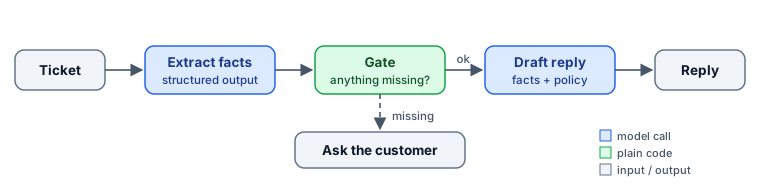
The idea: split the task into a fixed sequence of steps, where each model call gets the previous step’s output. Put plain-code checks, or gates, between the steps.
facts = await ask(f"Extract the key facts from this support ticket.\n\n{ticket}", schema=Facts)

if facts.category.lower() == "billing" and not facts.invoice_number:
    return f"Hi {facts.customer_name}, could you send the invoice number so we can look into this?"

return await ask(f"Facts: {facts.model_dump_json()}\n\nWrite the reply to the customer.",
                 system=f"...Follow this policy exactly:\n\n{POLICY}", effort="medium")
Why it works: each call does one small job, and small jobs are easier for the model and easier for you to test. The gate is the part people underrate. The check between steps is ordinary code: you can unit-test it, it costs nothing, and it gives the same answer every time. Here it stops the chain before the model writes a reply around missing information.
Use it when the task naturally breaks into steps you can name in advance: extract, then draft; outline, then write; translate, then check terminology.
Watch out for errors compounding. A wrong fact in step 1 becomes a confident wrong reply in step 2. Structured output in the early steps helps, because you can validate fields instead of parsing prose.
Also watch for replies that promise actions nobody took. When we ran this chain against a real model, the draft told the customer “I’ve located invoice INV-20931 and processed a full refund of the extra $49.00”, but nothing in this workflow can issue a refund. It only writes a reply. The model filled the gap with what a helpful agent would have done. If a reply describes actions, either give the chain the tool that performs them, with a gate that checks it succeeded, or tell the writing step to describe next steps, not completed ones.
2. Routing
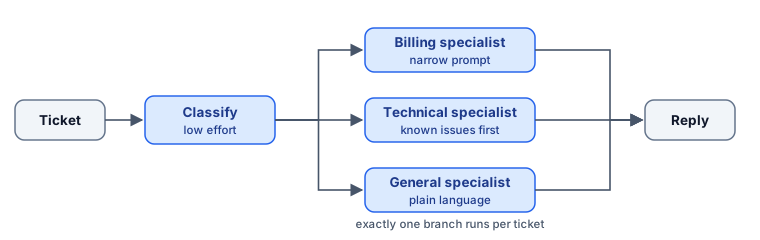
The idea: classify the input first, then send it to a handler built for that kind of input.
class Route(BaseModel):
    category: Literal["billing", "technical", "general"]
    reason: str

route = await ask(f"Classify this support ticket.\n\n{ticket}", schema=Route)
return await ask(ticket, system=f"{SPECIALISTS[route.category]}\n\nPolicy:\n{POLICY}", effort="medium")
Why it works: one prompt that tries to handle billing, bugs and how-to questions ends up as a pile of special cases, and improving one case quietly breaks another. Separate specialist prompts can each be tuned without touching the others. The Literal type means the classifier can only return one of the three valid routes, so the lookup in SPECIALISTS can’t fail.
Use it when inputs fall into distinct categories that need different handling, different tools, or different costs. Routing is also where cost savings live: a quick, low-effort classification call can send easy questions to a cheaper path and save the expensive one for hard cases.
Watch out for misroutes. Log the router’s reason and review the mistakes; they’re your best source of new categories or better descriptions.
3. Parallelization
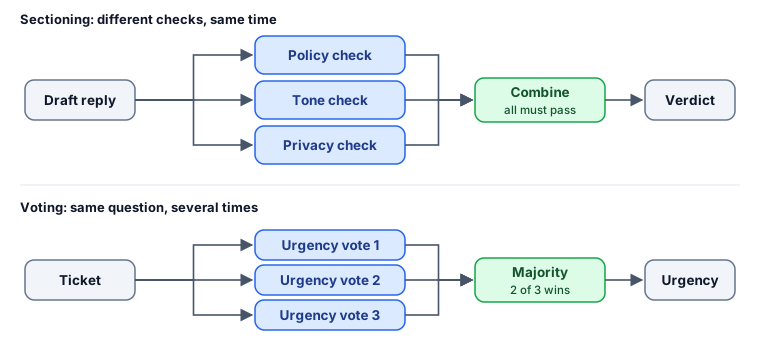
The idea: run several model calls at the same time, then combine their results in code. It comes in two forms:
- Sectioning: different independent subtasks run side by side. Here, three reviewers check a draft reply for policy, tone and privacy.
- Voting: the same question is asked several times and the majority wins. Here, three independent judgements of a ticket’s urgency.
results = await asyncio.gather(*(review(focus) for focus in REVIEWERS.values()))

votes = await asyncio.gather(*(ask(prompt, schema=Urgency) for _ in range(3)))
return Counter(v.level for v in votes).most_common(1)[0][0]
Why it works: a reviewer that only checks policy is more reliable than one checking policy, tone and privacy at once, and running the three in parallel costs no extra waiting time. Voting does something different. It smooths out the model’s run-to-run variation on judgement calls, and when the votes disagree, that’s a useful signal that a human should look.
Use it when checks are independent of each other (guardrails, multi-aspect reviews, extracting several fields), or when one wrong judgement is costly enough to be worth asking more than once.
Watch out for cost. Three parallel calls take the time of one but bill like three. Voting also only helps when the calls can actually disagree. If you ask the identical question with nothing varied, you mostly pay three times for the same answer.
4. Orchestrator-workers
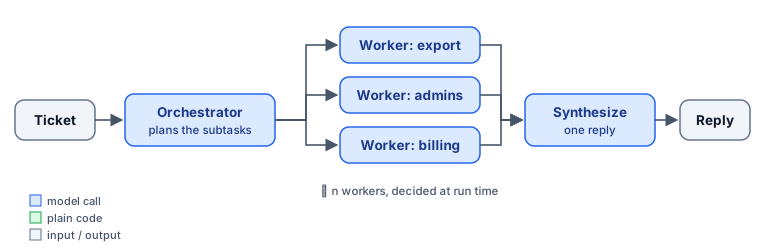
The idea: a model looks at the input and decides what subtasks it needs. Workers handle each subtask, often in parallel, and a final call combines their results.
plan = await ask(f"Split this ticket into independent questions, one per issue...\n\n{ticket}",
                 schema=Plan, effort="medium")
answers = await asyncio.gather(*(work(s) for s in plan.subtasks))
return await ask(f"...Specialist notes:\n{notes}\n\nCombine these into one reply.", ...)
How it differs from parallelization: in sectioning, you fixed the three reviewers in code. Here the model decides the number and nature of the subtasks at run time. The mixed ticket becomes three subtasks, while a single-issue ticket like billing should become just one. This is the first pattern where the model shapes the work, which puts it on the boundary between workflows and agents.
Use it when the input is compound, and you can’t know how many parts it has until you read it: multi-question tickets, code changes that touch an unknown number of files, research questions that split into sub-questions.
Watch out for bad plans. A plan that splits too finely or misses an issue spoils everything after it. Keep the plan structured (a typed list, not prose) so code can check it, for example by capping the number of subtasks.
5. Evaluator-optimizer
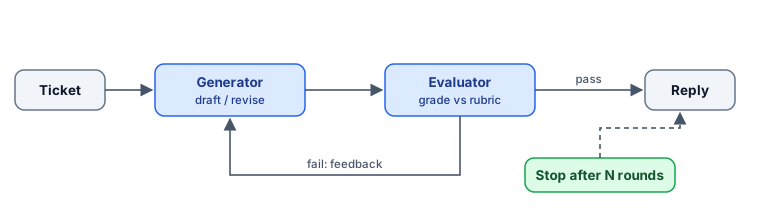
The idea: one call produces an answer, and a second call grades it against explicit criteria. If it fails, the feedback goes back for a rewrite. Repeat until it passes or you hit a limit.
for round_ in range(1, MAX_ROUNDS + 1):
    verdict = await ask(f"...Rubric:\n{RUBRIC}...Reply:\n{reply}\n\nGrade the reply strictly...",
                        schema=Verdict, effort="medium")
    if verdict.passed:
        return reply
    if round_ == MAX_ROUNDS:
        break  # don't spend a rewrite nobody will grade
    reply = await ask(f"...Reviewer feedback:\n{verdict.feedback}\n\nRewrite the reply...", system=writer)
Why it works: spotting a problem is easier than avoiding it while writing. The writer is juggling content, tone and length. The evaluator only has to check a short list. The rubric is what makes this pattern work. “Is this good?” produces vague feedback; “Does it promise a fix date? Does it answer all three questions?” produces feedback the writer can act on.
Use it when you can state what “good” means as checkable criteria, and a second pass measurably improves the result: policy-bound replies, translations, code that must pass tests, summaries that must cover required points.
Watch out for loops that never converge. Always cap the rounds (MAX_ROUNDS), and decide in advance what happens to a reply that still fails, such as flagging it for a human. Also be aware that a model grading output similar to its own can be too lenient. Where you can, use code-checkable criteria such as word counts and required phrases, or real tests.
What each pattern costs
Every extra call adds money and waiting time. Counting them from the code above, with n subtasks and k evaluator rounds:
| Pattern | Model calls per ticket | Waiting time (calls in a row) | Who decides the steps |
|---|---|---|---|
| Single call | 1 | 1 | — |
| Chaining | 2 (1 if the gate stops it) | 2 | code |
| Routing | 2 | 2 | code (model picks the branch) |
| Parallelization, 3 checks or votes | 3 | 1 | code |
| Orchestrator-workers | n + 2 | 3 | model plans, code executes |
| Evaluator-optimizer | 2k (max 6 at k = 3) | 2k | code loop, model judges |
| Agent | unbounded, capped by your step limit | same as calls | model |
Two things stand out. Parallelization is the only pattern that adds calls without adding waiting time. And the agent is the only row with no fixed upper bound unless you add one, which is why the step limit in post #1 isn’t optional.
Each companion script ends by printing its model calls, input and output tokens, and elapsed time. Run all five on the mixed ticket to see these differences in real numbers for your model and prompts.
Patterns combine
Real systems mix these patterns. A realistic support pipeline might route each ticket, handle compound tickets with an orchestrator, run parallel guardrail checks on every draft, and use an evaluator loop only for the categories where mistakes are expensive. Each piece stays small enough to test on its own.
An agent can also sit inside a workflow. The technical-specialist branch could be a small agent with access to logs and the issue tracker, while everything around it stays fixed. That’s often the best of both: autonomy where the path really is unknown, predictability everywhere else.
When you actually need an agent
Pick the simplest option that works, and move right on the spectrum only when you find a reason. Three questions settle most cases:
- Can you write the steps down in advance? If yes, use a workflow. If the steps depend on what you find along the way (debugging, open-ended research, exploring a codebase), you need the model to steer.
- Can you check the result? Agents make more mistakes in more varied ways. Tests, a rubric or a human reviewer at the end make an agent safe to use. If nothing checks the result, keep the structure in code.
- Is the task worth the cost? An agent can take many calls where a workflow takes two or three. That’s fine for an hour of engineering work and wasteful for a password-reset reply.
If the answer to the first question is yes, the five patterns above will cover most of what you build. They’re also easier to debug: when a workflow breaks, you know which step to look at.
Try it
git clone https://github.com/agentic-systems-ai/examples
cd examples/02-patterns
pip install -r requirements.txt
python p4_orchestrator.py mixed
Then try the experiments in the README. For example, check whether the parallel policy reviewer catches the sample draft’s “fixed by Friday” promise, which breaks the policy.
Next in the series: Context is a budget: a practical guide to context engineering.
Sources & further reading
- Anthropic, Building effective agents (Dec 2024): the original description of these five workflow patterns, and the case for starting simple.
- HumanLayer, 12-Factor Agents: principles for owning your control flow and prompts. Many “agents” in production are mostly well-structured software.
- Wang et al., Self-Consistency Improves Chain of Thought Reasoning in Language Models (2022): the research behind sampling several answers and taking the majority.
- Madaan et al., Self-Refine: Iterative Refinement with Self-Feedback (2023): an early study of generate, critique and revise loops.