Designing tools agents can actually use
Companion code: 04-tools
TL;DR
- An agent sees your tools only through their names, descriptions, parameters and responses. Those are its whole user interface, and most agent failures that look like “the model is confused” are interface problems.
- Design for the agent’s constraints, not for your API’s shape: search instead of list, return meaning instead of IDs, keep responses short by default, and write errors that say what to do next.
- Treat tools like code: change them against an eval, and measure accuracy, tool calls, tokens and errors.
A new kind of user
In 2024 the SWE-agent paper (Yang et al.) made an observation that’s easy to state and easy to underrate: language-model agents are a new category of user, and they do better with interfaces built for them. The authors called this the agent-computer interface (ACI), by analogy with human-computer interfaces. They showed that a coding agent’s results depended heavily on details such as how its file viewer and search commands worked, not just on the model behind it.
Agents have different constraints from human developers:
- Everything they read costs context. A human can scroll past 240 rows of JSON. An agent reads all of them, and re-reads them on every later step (post #3).
- They can’t ask what you meant. The description is all the documentation they get.
- They’re literal. A parameter called
userwill receive names, emails or IDs depending on the model’s guess.
Anthropic’s engineering post Writing effective tools for agents — with agents (September 2025) turns this into practical advice. This post works through it on concrete code.
The experiment
The companion code (04-tools) builds a small fictional CRM: 240 customers with their orders and support tickets. It exposes the same data through two tool sets.
v1, “API wrapper”: the tools you’d write by mirroring a typical REST API.
def v1_list_customers() -> str:
    return json.dumps([{"uuid": c.uuid, "name": c.name, "email": c.email, "city": c.city, "plan": c.plan}
                       for c in CUSTOMERS])

def v1_get_orders(customer_uuid: str) -> str:
    return json.dumps(BY_UUID[customer_uuid].orders)  # a bad ID surfaces as a bare KeyError
v2, “agent-shaped”: the same data, designed around how an agent works.
def v2_search_customers(query: str, city: str | None = None, limit: int = 5) -> str: ...
def v2_get_customer_context(customer_id: str, response_format: str = "concise") -> str: ...
Here’s what each design costs to answer one question:
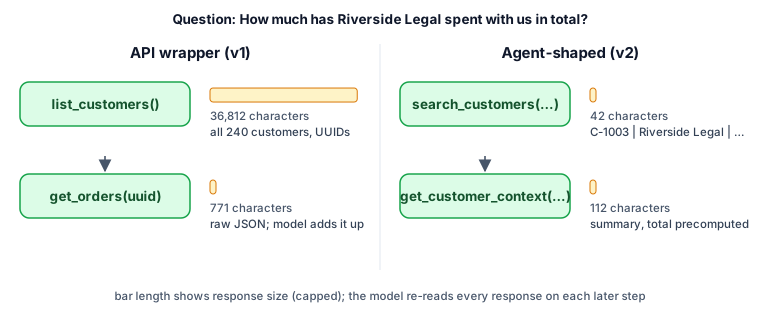
v1 makes the agent read about 37,600 characters and add up eight order amounts in its head. v2 reads 154 characters and gets the total already computed. The model behind both is identical; only the interface changed.
What that does to a real agent. We ran the companion eval against Claude Opus 5.5: six questions, each tool set, one run each.
| Correct | Tool calls per task | Tokens read per task | |
|---|---|---|---|
| v1, API wrapper | 6/6 | 2.0 | 38,960 |
| v2, agent-shaped | 6/6 | 2.3 | 2,792 |
The surprise is the first column. A current frontier model is good enough to get the right answers through a bad interface: it read all 240 customers, found the right UUID and added up the orders correctly. Accuracy alone would tell you the two designs are equally good. The cost tells you otherwise: v1 read about 14 times as many tokens for the same answers, on every question, for as long as the agent runs. A good tool interface doesn’t only rescue weak models. It makes strong ones affordable.
Seven rules
1. Build for the task, not for the API
APIs are designed for programs, which have unlimited memory and loop cheaply. So list_customers makes sense for a program: fetch everything, filter locally. For an agent it’s the worst option, because “filter locally” means reading everything.
Ask what the agent is trying to accomplish and build tools for that. Anthropic’s guide gives the same contrast: search_contacts rather than list_contacts, or a single schedule_event rather than separate tools for listing users, checking calendars and creating events. Consolidation also cuts round trips. v2’s get_customer_context replaces v1’s separate order and ticket calls.
2. Return meaning, not identifiers
Compare these two results:
v1: {"uuid": "80bacd64-7a0e…", "name": "Riverside Legal", …}
v2: C-1003 | Riverside Legal | Leeds | Starter
UUIDs are noise to a model: long, unpronounceable and easy to mistype when copied into the next call. Anthropic reports that simply resolving opaque IDs to meaningful names noticeably improved Claude’s precision. If you need stable IDs, make them short and readable (C-1003). And return derived facts the agent would otherwise compute. v2 returns total $1,972, so the model doesn’t have to add up eight numbers correctly.
3. Keep responses short by default, detailed on request
"response_format": {"type": "string", "enum": ["concise", "detailed"]}v2 returns three lines by default, and the full record (about 1,200 characters) only when asked. Anthropic’s guide uses the same enum, and its example concise response was about a third the size of the detailed one. Apply the same thinking to anything that can grow: paginate, filter, set sensible default limits, and when you truncate, say so and suggest how to narrow the query. v2’s search ends with (10 more matches - refine the query or raise limit).
4. Errors are instructions
v1: KeyError: 'C-1003'
v2: Unknown customer_id '1003'. IDs look like 'C-1042'; use search_customers to find one by name.
When an agent gets a bad result, its next step depends entirely on the error text. A raw exception tells it that something failed. A good error message tells it what to do next. This is the cheapest improvement on the list. It costs nothing when things go right, and it saves a wasted step, or a hallucinated answer, when they don’t.
5. Descriptions are prompts
v1’s descriptions are what you’d write for yourself: “Get orders.” v2’s are written for a capable new colleague who can’t ask questions:
"description": "Find customers by words in their name or email, optionally within one city. Returns up to "
               "`limit` lines of 'customer_id | name | city | plan'. Use the customer_id with get_customer_context.",
Say what the tool is for, what it returns, and how it connects to the other tools. Give each parameter an unambiguous name (customer_id, not customer) and an example value. Anthropic notes that careful refinements to tool descriptions were part of how Claude reached a state-of-the-art SWE-bench score.
6. Fewer, more distinct tools
Every tool is a choice the model has to make on every step. Two tools that do almost the same thing (search_customers and find_client) force a guess, and the guess will sometimes be wrong. Prefer a handful of well-separated tools. When you do need many, group them with consistent prefixes (crm_search, crm_get_context, billing_refund) so the model can tell the families apart. Anthropic found that even the choice between prefix and suffix naming made a measurable difference.
For very large tool collections, the answer is no longer to show the model everything. Current platforms let an agent search for tools and load only the ones it needs. We’ll come back to that in post #6, when tools become code.
7. Evaluate tools like code
None of the rules above is guaranteed to help your agent on your tasks. Treat tool design like any other engineering change: make a hypothesis, measure it, keep the change only if it helps. The companion eval is a minimal version:
TASKS = [
    (f"How much has {C['C-1003'].name} spent with us in total?", [str(spend(C["C-1003"]))]),
    (f"Which plan is {C['C-1058'].name} on, and which city are they based in?", [C["C-1058"].plan, C["C-1058"].city]),
    ...
]
The expected answers are computed from the data, so they’re always correct. For each run it records four numbers, and you need all four:
- Accuracy: did the agent get it right?
- Tool calls: how many steps did it take?
- Tokens: how much did it read? This drives cost and latency.
- Errors: how often did a call fail, and did the agent recover?
Then read the transcripts. The numbers tell you that something is wrong; the transcripts tell you why. Anthropic’s guide goes a step further: give a model the failing transcripts and ask it to propose better tool descriptions. That’s a cheap way to get a second opinion.
Try it
cd examples/04-tools
python eval.py --tools v1
python eval.py --tools v2
With a strong model, expect both versions to be accurate and the token column to tell the story. Run several times before trusting a small difference (post #12). Then change one thing at a time. Give v1 good descriptions but keep its list-everything design, or give v2 raw errors, and see which change moves which number. The README suggests a few experiments.
Trade-offs
- Agent-shaped tools are more opinionated.
get_customer_contextdecides what “context” means. If a task needs something else, the agent has to ask fordetailedor you need another tool. Your eval tasks should cover the questions people actually ask. - Consolidation can go too far. One giant
do_everything(action, …)tool just moves the confusion into its parameters. Aim for one tool per job, not one per endpoint and not one in total. - Your existing API isn’t wasted. v2 is a thin layer over the same data. Keep the API for programs and add an agent-facing layer on top.
Next in the series: MCP explained, and what changed when it went stateless.
Sources & further reading
- Anthropic, Writing effective tools for agents — with agents (Sep 2025).
- Yang et al., SWE-agent: Agent-Computer Interfaces Enable Automated Software Engineering (2024).
- Anthropic, The “think” tool (Mar 2025): a tool that does nothing except give the model a place to reason between tool calls.
- Anthropic, Introducing advanced tool use (Nov 2025): tool search, programmatic tool calling and tool-use examples, for agents with many tools.