Tool calls or code? When agents should write programs
Companion code: 06-code-mode
TL;DR
- In code mode, the model writes a short program that calls its tools; a sandbox runs it, and only the program’s printed output comes back. Loops, filtering and arithmetic happen in code, where they’re cheap and exact.
- It’s often pitched as the cure for tool-calling “ping-pong”. But current models already make independent calls in parallel, in a single turn. In our test of a 32-call lookup task with small results, plain tool calls read 9,052 tokens and code mode 14,717. Make each result seven times bigger and the order flips: 23,193 for plain calls, 14,464 for code mode. All answers were correct.
- Code mode pays off when intermediate results are large, when calls depend on each other, or when the work needs exact computation over lots of data. For small, independent lookups, plain parallel tool calls are simpler and cheaper.
The ping-pong problem, and the shortcut models already take
Take a task from our running CRM example (post #4): for every Lisbon customer with an open support ticket, list their name and total spend, then count and total them. With good tools, that’s one list_customers("Lisbon") and then a get_customer for each of the 31 customers. That’s 32 tool calls.
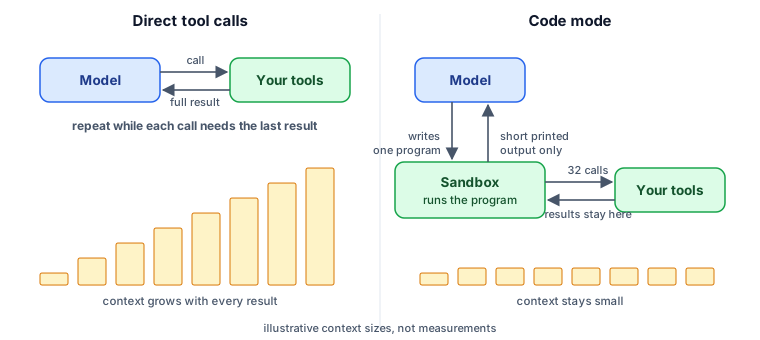
With classic tool calling, each call is a round trip through the model:
- The model emits a tool call.
- Your code runs it, and the full JSON result is appended to the conversation.
- The model reads everything again (the task, the instructions, every earlier result) and decides the next call.
If the model really made one call per turn, by the 31st lookup it would be re-reading thirty customer profiles it has already finished with (post #3 covered why that costs money and attention). And the final step, adding up 13 spend figures, would be arithmetic done “in its head”, which is exactly what language models are least reliable at.
In practice, current models take a shortcut when calls don’t depend on each other: parallel tool calls. After listing the 31 customers, the model in our test requested all 31 get_customer calls in a single turn. Three model requests in total, not thirty-three. So for independent lookups, the ping-pong mostly disappears on its own. It comes back when each call depends on the previous result (follow a chain of references, search, then refine, then fetch), and the cost of every result passing through the context remains either way.
Let the model write the loop
The alternative is to present the tools as functions in a programming language and let the model write code that uses them. For our task, the model might write:
import json

customers = json.loads(await list_customers({"city": "Lisbon"}))
profiles = [json.loads(await get_customer({"customer_id": c["customer_id"]})) for c in customers]
hits = sorted((p for p in profiles if p["open_tickets"]), key=lambda p: -p["total_spend_usd"])

for p in hits:
    print(f'{p["name"]}: ${p["total_spend_usd"]:,}')
print(f"{len(hits)} customers, ${sum(p['total_spend_usd'] for p in hits):,} combined")
The 31 profiles never enter the model’s context. The program reads them, filters, sorts and sums them exactly, and prints about fifteen lines. The model reads those fifteen lines and writes its answer.
The model is good at this for a plain reason: it has seen vastly more real code than examples of special-format tool calls. A for loop, an if and a sum() are what it writes most fluently.
An old idea, rediscovered three times
This isn’t a 2026 invention. It’s the same insight showing up at three levels.
2024, research: code as the action space. CodeAct (Wang et al.) let agents act by writing executable Python instead of emitting JSON tool calls. Code lets one action compose several tools with loops and conditions, and across 17 models CodeAct outperformed the usual JSON and text formats. The same year, Thought of Search (Katz et al.) applied the idea to planning. Instead of having the model search a problem space step by step, which is slow and error-prone, it had the model write the search code: the successor and goal functions, which an ordinary search algorithm then ran exhaustively and correctly. A handful of model calls solved whole benchmark datasets. Its follow-up, Automating Thought of Search (Cao, Katz et al.), took the human out of the loop by having the model test and fix its own search code. Let the model write the program; let the program do the grinding.
2025, practice: code mode for MCP. In September 2025 Cloudflare described Code Mode: convert an MCP server’s tools into a typed API, have the model write code against it, and run that code in a sandbox. Two months later Anthropic’s Code execution with MCP made the same argument for agents with many tools. Two costs dominate: loading every tool definition up front, and pushing every intermediate result through the model. In their example, moving a document between two systems dropped from roughly 150,000 tokens to 2,000. Cloudflare later took the idea to its limit: two tools, search and execute, give an agent the entire Cloudflare API in about a thousand tokens of definitions.
2026, platforms: code as the harness. By this year the idea had moved into infrastructure. The Claude API’s programmatic tool calling (used in this post’s demo) runs the model’s code in a managed sandbox that calls your tools. Research has generalized it further: Code as Agent Harness (May 2026) argues that code is becoming the medium through which agents reason, act, keep state and check their own work, not just one tool among many.
How it works in practice
The demo uses the Claude API’s programmatic tool calling, which needs two changes to an ordinary tool-using request. First, add the code-execution tool. Second, mark the tools that code may call:
tools = [{"type": "code_execution_20260120", "name": "code_execution"}] + [
    {**schema, "allowed_callers": ["code_execution_20260120"]} for schema in crm.SCHEMAS
]
Then the loop changes in one important way. When the running code calls get_customer, the sandbox pauses and the API returns an ordinary tool_use block, tagged with a caller that says it came from code. You run the tool and send back the result, exactly as before, but the result goes to the waiting program, not into the model’s context:
if container:
    kwargs["container"] = container  # required while code is paused waiting for our tool results
...
results.append({"type": "tool_result", "tool_use_id": call.id, "content": crm.TOOLS[call.name](**call.input)})
messages.append({"role": "user", "content": results})  # tool_result blocks only
Two details matter here. Pass the sandbox’s container ID back on every continuation, so the paused program can resume. And while code is waiting, your reply must contain only tool results, with no extra text.
There’s a nice security property too: the model’s code never runs on your machine, and your tools never run in the sandbox. The sandbox calls out to your application through the same tool interface as before, so your tools keep their own validation and permissions.
What we measured
We ran the companion code against Claude Opus 5.5 twice per mode. First with the normal small customer records (about 200 characters each), then with --detailed, where each record also carries the customer’s full order and ticket history (about 1,400 characters each, seven times bigger). All four runs answered correctly: 13 customers, $10,255.
| Records | Mode | Model requests | Tool calls | Tokens read |
|---|---|---|---|---|
| small | direct tool calls | 3 | 32 | 9,052 |
| small | code mode | 3 | 32 | 14,717 |
| detailed | direct tool calls | 3 | 32 | 23,193 |
| detailed | code mode | 3 | 32 | 14,464 |
With small records, plain tool calls won. Two things explain it. First, the model batched all 31 lookups into one parallel turn, so there was no ping-pong to remove. Second, the records were small, so passing all of them through the context cost less than code mode’s own overhead: the sandbox tool’s definition, the program the model writes, and the extra bookkeeping.
With bigger records, the lines crossed. Direct tool calls had to push every full history through the model’s context, and their cost rose about 2.5 times. Code mode barely moved, because the histories went to the program, not the model; only the short printed table came back either way. Code mode came out about 38% cheaper.
That’s the real rule, measured: code mode’s advantage scales with how much intermediate data you’d otherwise route through the model. The published wins sit far out on that curve. Anthropic’s example moved a long document between two systems, with about 150,000 tokens of intermediate data dropping to 2,000, and Cloudflare’s put an entire API behind a search-and-execute pair. Measure on your own workload before switching.
When it doesn’t pay
Code mode isn’t free:
- Small, independent lookups. As measured above: if the model can make the calls in parallel and each result is small, plain tool calls are simpler and cheaper.
- Every call is still a round trip to your app. The model isn’t re-run between calls, but your tool still executes 32 times. Code mode saves model work, not tool work.
- Short, sequential tasks don’t benefit. If each step needs the model’s judgment about the previous result (“read this email, decide whether to reply”), there’s no loop for code to absorb. Anthropic’s documentation for the feature makes the same point: on a benchmark where each turn makes one or two sequential calls, it left scores unchanged and cost slightly more.
- You need a sandbox. Running model-written code safely means isolation, resource limits and monitoring. A managed sandbox, as in the demo, removes most of that burden. Rolling your own is a real project.
- Debugging moves. When something goes wrong, the evidence is in the program and its output, not in a sequence of tool calls. Log the code the model wrote.
A good rule of thumb: use code mode when the intermediate data is big or the chain is long. Large results that need filtering, calls that depend on earlier results, and exact computation over many records all point to code mode. Small independent lookups, and steps that each need the model’s judgment, point to plain tool calls.
Try it
cd examples/06-code-mode
python compare.py --mode direct
python compare.py --mode code
python compare.py --mode direct --detailed
python compare.py --mode code --detailed
Each run prints the answer, how many API requests and tool calls it made, the total tokens the model read, and the correct answer (13 customers, $10,255 combined). Compare the tokens read line between the two modes. With small records, expect plain tool calls to win, as they did for us. Then add --detailed to make every record carry its full history, and watch the lines cross. The README has more experiments.
Trade-offs
- Correctness moves into code. Exact arithmetic is a gain. A subtle bug in the generated program is a new failure mode. Have the program print enough intermediate facts (counts, a few sample rows) for the model and you to sanity-check.
- Your tools need machine-friendly output. Code wants JSON it can parse. Prose summaries, which suit direct calls, are awkward to use from code. Offer structured output, as
get_customerdoes here. - It reshapes tool design. With code mode, a few general tools plus good documentation can replace dozens of narrow ones, which loops back to post #4 with a new answer to “how many tools?”.
Next in the series: One agent or many? Reading the evidence.
Sources & further reading
- Wang et al., Executable Code Actions Elicit Better LLM Agents (CodeAct, 2024).
- Katz et al., Thought of Search: Planning with Language Models Through The Lens of Efficiency (2024), and Cao, Katz et al., Automating Thought of Search (2024).
- Cloudflare, Code Mode: the better way to use MCP (Sep 2025), and Code Mode: give agents an entire API in 1,000 tokens (Feb 2026).
- Anthropic, Code execution with MCP: building more efficient agents (Nov 2025).
- Claude API documentation, Programmatic tool calling.
- Code as Agent Harness (May 2026).